Hour of Code with Makey Makey

I’m at a new school and was unsure of how to get our high school students into the #HourofCode activities since what I usually did in the past ( code.org ) is geared toward younger students.

Lucky for me, I have a teacher willing to try new things with his BLAST class. BLAST is a lot like AVID, the students are paired with mentors and the class is geared toward teamwork and problem-solving.

They’ve already been in the library for programming Sphero, so I thought it would be fun to program REAL THINGS like marshmallows and bananas. What better to do that with than Makey Makey ? Mr. S wanted the students to work together to complete some challenges and so the plan was to rotate from the Makey Makey station to the littleBits Design Challenge, and our brushbot challenge, but students ended up staying focused on completing one challenge in this class period. (Which means I need to have them back for more MAKING! )

#littlebits problem solving challenge and #makeymakey challenge for #hourofcode! #celebrateMonday #librariesofinstagram

A video posted by colleengraves.org (@makerteacherlibrarian) on

This summer I had the privilege of writing lesson plans for Makey Makey, so I was excited to try the ELA Logic Puzzle Lesson with an active class. (I taught it at the public library this summer, but not at school yet!)

I love how simple this lesson seems to be on the surface, until the kids have to actually design the logic sequence.  Students have to use real problem solving skills to make the game play logistical AND they learn coding terms all while making what appears to be a pretty simple game.

The last class giggled a lot, but really got into making shapes with the pen tool and recording sounds for the objects to make when you answered riddles correctly. I wish we had more time to make these games even more complex!

These girls really wanted to use the pen tool in #scratch during our #makeymakey #hourofcode challenge ! #library #makerspace

A video posted by colleengraves.org (@makerteacherlibrarian) on

Teaching these classes was awesome! I hope to entice more teachers into incorporating coding into their curriculum, but for the rest of the week, I’ve decided on some passive programming incorporating a lot of things we already do in our library makerspace for our regular makers.

Terminal Quest for #kano and #hourofcode ! #raspberrypi

A photo posted by colleengraves.org (@makerteacherlibrarian) on

Students have the option to:

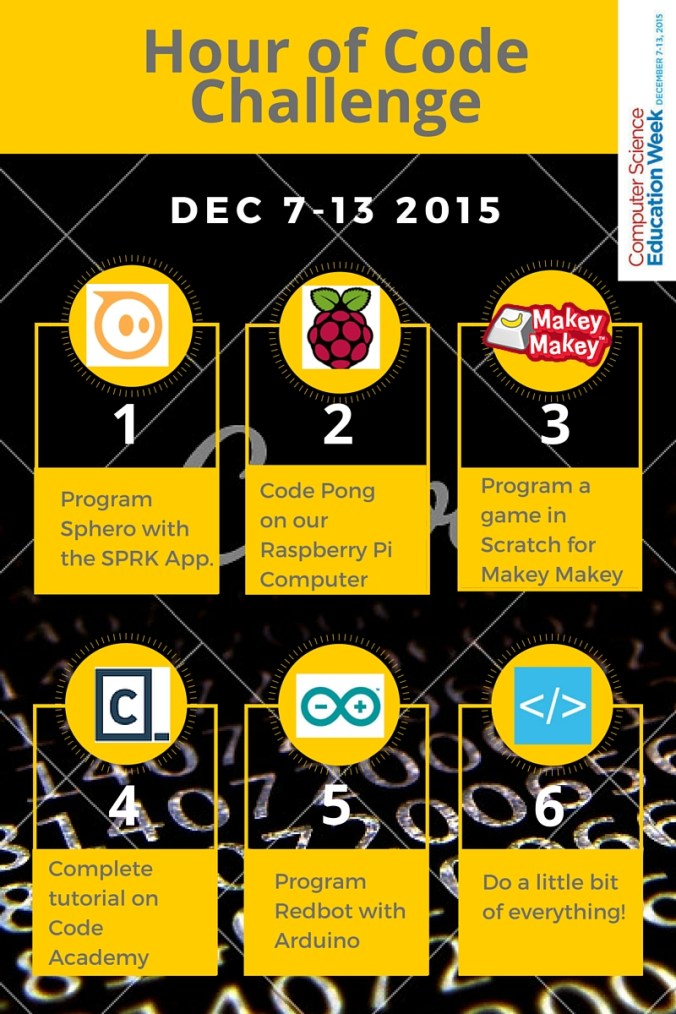
  • Program Sphero or Ollie using the SPRK app and navigate these bots through a cardboard maze.
  • I just downloaded the Kano OS ( THANK YOU OPEN SOURCE!) to our library Raspberry Pi and I LOVE IT! So students can come in and learn to code by creating their own version of Pong, Snake, and Minecraft. Or they can code their own art, or play the text-based adventure Terminal Quest.
  • Creating any game for Makey Makey.
  • Complete a tutorial on Code Academy.
  • Program our Sparkfun Redbot using Codebender.cc.

So will they bite? Will high school students really come in and learn to code? A few visited while I was teaching BLAST and played with Kano and  joined our Makey Makey fun. Others have already started asking for more books on programming languages. (Have any you’d recommend?) I hope to see even more students curious about coding this week (even though I’ll be teaching research classes during lunches.)

Can’t wait to see what the rest of the week holds!

Bonus: here is a remixable flyer in Canva of our activities if you want to remix it and use it!
Hour of Code Challenge (1)

Note this is a watermarked draft, so change the background image, or pay the good folks at Canva to remove the watermark!)


Sphero Programming and BLAST classes

Had a great couple of days this week facilitating Mr. S’s BLAST classes! We challenged the students to do some simple programming with Sphero using the Tickle App.

Teamwork

Our goals were to:

  • teach the students some collaboration/teamwork skills
  • introduce the concept of coding
  • teach students to own their failures and learn from them
  • teach students to problem solve for different outcomes

Lucky for me, I was able to borrow a great lesson from my #superlibrarianhubs, Aaron Graves that he taught with AVID students last year.

Mr. S and Mrs. R paired BLAST students ahead of coming to the library, and we showed them a quick video about Sphero featuring Grant Imahara.

I had them spread out around the library to test drive Sphero with the Drive app for a few minutes (because you always have to let them play a little bit to get them engaged.) However, once we start programming, I warned the students that I will take the iPads and Spheros from them if they used the drive app instead of programming. (I know, I know, mean librarian…)

After their initial drive, we brought them back together to teach them a few coding tricks. I kept things simple and taught them that every program needs a “When” block and posed the question, “Why?” A few gamers quickly realized, that if you don’t tell your game/program “When to start,”  you can write all the code in the world, but nothing will happen.

Before class, I’d made 12 stations around the library with tape.  An initial red dot of tape to start and a long red piece of tape for the stop.  I also put a second orange piece of tape to place the obstacle so that students could easily grab an obstacle for that section of the lesson. The first challenge was for students to program Sphero to drive from the start and stop on the tape.  Even though programming Sphero to drive in a straight line sounds easy, it is actually quite a difficult task.  Lining up the tail light is tough for the novice, but adjusting the time to get it stop at the stop line is where the real fun begins. It’s also hard to catch these successes on video!

My favorite part of this lesson was discussing how we all solved the problem with different solutions.  The students were able to adjust speed and the length of drive time for different outcomes. Some students even noticed that certain areas of the library had more friction and so even the same drive time would not guarantee the same result! We were secretly teaching them physics!

Programming

The students were also challenged to drive around an obstacle and jump a ramp. For this, I added more “motion” block knowledge to the students’ toolbox, and I loved listening to them plan their strategies out loud. I could definitely see the Martinez and Stager Think Make Improve process at work.  The best part of the lesson was really discussing what works best programming-wise and discussing why some teams were more successful than others. The most successful teams were the ones who just started trying and weren’t afraid to fail.  Which led me to sharing how Thomas Edison had over a 1,000 unsuccessful attempts at creating the lightbulb (which I learned reading Creative Confidence based on Diana Rendina’s suggestion), and that if he had given up, we’d be sitting there in the dark.

Our last challenge was “The Slow Race” we had students program Sphero to drive from the start to the stop and the winner would be the student who took THE MOST time getting there.  We discussed why Sphero wouldn’t roll with under 10% speed on the carpet versus the smooth table and one student even had a great hack where they started Sphero at 25% and then dropped down to 7% because the initial inertia would keep it moving!

image

So the teachers and I pressed the students to “own their failures and learn from them.” We taught them some basic coding skills and we saw some great examples of teamwork. Now the teachers want to come back next month for a communication/programming exercise where we have an obstacle course in between the stacks and one student has to tell the other student how to create the program and the student programming Sphero can not see the course.

Until then, we are going to be trying out a new art trick I found over at iPad Art Room where the students program Sphero and create light trail art!

Sphero Light art made by my 6 YO

Sphero Light art made by my 6 YO

Logistics Tip: We only used 12 Spheros at a time so that we could charge the other 12 Spheros for the next class.  I also have my Spheros paired with specific iPads and I had them laid out for students ahead of time.  Sometimes, Sphero can still be cranky, so I brought one of my mobile charging units to the classroom area in case we had to reset any Spheros. I left the other 12 charging in my office so it was clear which Spheros were charging for class and which ones we were using for that period!