What age is best? littleBits Student STEAM Set Review Part II

This slideshow requires JavaScript.

Earlier this week, I posted my review of the new littleBits STEAM set, and I’ve already had a few pertinent questions. I love the bits in this kit and I especially love the manual that comes with it. One of the best things about the manual is how it helps students understand the real world applications they can recreate with littleBits projects. Plus, it is chocked full of ideas for inventing and prototyping.

But what age is best? And how many kits would you need for your space?

Age?

The kit claims it is ideal for grades 3-8.  So I wondered, how would my high school students respond? (Keep in mind that we already have a littleBits Pro-Library.)

So I left the kit out yesterday as a passive program.  First block a student decided to build the throwing arm and quickly moved from following that project, to coming up with his own ideas.

He’s decided to build a double jointed contraption. Here the student is testing out connecting the servo motor and the DC motor and not quite getting the result he wants. Which is a good thing. This made him brainstorm more ideas and decide to keep working on this project over the next couple of days. We set aside his work on the project shelf and I look forward to seeing how he ends up improving his ideas.

The manual and the accessory pack are helping him see littleBits in a new way. Utilizing this accessory  for the throwing arm project even has him thinking about designing his own accessory on our 3D printer.

Another group of students came in later in the morning and decided to attempt an art machine. I came by a few times to see how they were progressing and noticed they weren’t following the instructions, but instead, were using those instructions as a spring board for their own art car. They didn’t want their art machine to make scribbles, they wanted a perfect circle. Plus, the students had broken up into separate groups and one group decided to tinker with the Synth bits.

(Ironically, we have a Perfect Circle Machine with littleBits as one of our projects!)

I love seeing how just a few guided instructions were leading these students to new ideas. One of my goals in our library is to give students new skill sets.  I want them to fill their toolbox with new skills and then use that knowledge to be more creative and become active producers in our world and not just passive consumers.  One way I see that happening is by learning how things work and by making and completing different types of projects.  This is one of the reasons why I’m working on a makerspace project book with the #superlibrarianhubs! We want making and invention to be accessible to all of our students (and for your students too). We like to give our students just a little nudge toward innovation by helping them put new tools in their toolbox.  After all, learning how things work is a foundational step in the invention cycle.
recite-19lprxc


So, what age would I suggest is ideal for this STEAM Student Set? I saw my 7 year old loving it and my high school students springing toward new ideas. I’m going to have to say this is quickly becoming one of my most favorite littleBits kits since the Space kit! I am not going to rush out and buy a ton of these because we already have the Pro Library, but if I didn’t, I might think about buying these sets instead of the massive Pro Library. Although, this set will definitely need a stronger organization system than the box it comes in! My high schoolers were pretty rough on the packaging in just the one day!

Bottom line? Preferred Ages: 7-75

This is good for any-aged makerspace! (Academic libraries, this would be an excellent resource for your pre-service teachers in the education program.)

But how much should we buy?

Well, this depends…. do you see yourself using this resource in full classes? Or in small stations? Maybe as a passive program?

When people ask me which littleBits to buy, I often refer to my massive collection (aka the Pro Library), but I also love the Space kit and the Synth kit. I’ll be adding this STEAM set to my list of favorite kits because I love the included bits. (I’m a nerd for sensors).  But how many will you need for your class? or your space?

What you buy is up to you and your students. What do they want your students to learn? What are the goals of your makerspace?  How do you envision rolling out learning with littleBits?

It’s important you ask yourself this question:

So form some goals and a steering committee (I’ll have more on this in the book #thesuperlibrarianhubs and I are writing with Diana Rendina), and then align your purchases with the goals you’ve created for your makerspace.

Review of New littleBits STEAM Student Set !

20160306_080533

Ayah Bdeir just announced a new kit at SXSWedu today, and I’m excited to share my thoughts on this awesome new STEAM Student Set from littleBits.

There aren’t any new Bits, but this collection has some of my favorite Science/Space kit bits from littleBits and some great accessories for building some simple inventions. Lots of cool sensors, the new updated DC motor that makes building cars easier, pulse, an inverter, fork and more. See the full set here.

My favorite thing about the kit though is the AWESOME book that comes with it. It is evident that littleBits has listened to educators and our ever-pressing need for clear instructions.

20160306_080628

Yes, the maker movement is all about tinkering and playing to learn, but sometimes, you just need basic instructions! I love the larger sized manual and the extensive section on learning how each bit works.  When I did my synth workshop (Thank you, Chad Mairn!!!)  at the beginning of the school year, I followed Chad’s footprints, sharing how each Korg littleBit worked, and it really helped the students focus on learning what kinds of sounds we could make. Plus, it helped us understand what is inside of a synthesizer and how some of our favorite music has been created.

The Manual

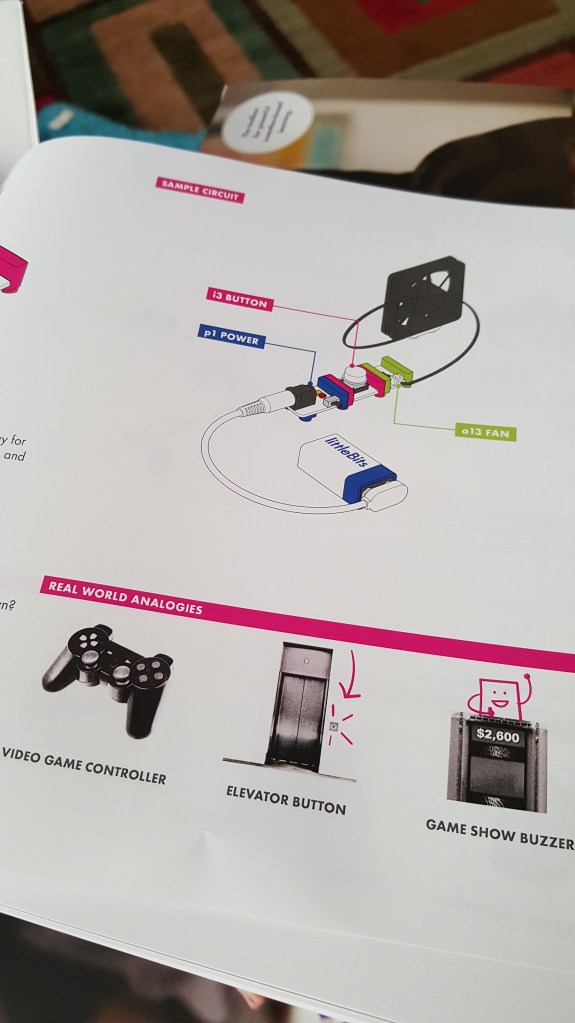
The Student Set manual has great instructions for how each bit works that will really help students slow down and learn about the functionality and usefulness of each component in the kit. I loved the theory my 7 year old had while playing with this section learning about inputs and outputs and how the “button” works.

“When I let go (of the button) the electricity is stuck, but when I press on the button, the electricity is not stuck and it goes through (to the fan).” We went on to talk about how this functions sort of like a gate, allowing electricity to move and keeping the electricity from moving.

I’m all for letting students tinker and play to learn, but I’ve seen quite a few high school students that did not grasp the “input” vs. “output” coloring system as quickly as a younger more playful student might. Instead, they gave up on the littleBits concept and tried something else in our makerspace. I’m hoping these instructions will allow students to tinker and learn with less guidance from an adult.

Real World Analogies

My other favorite thing about this manual is the “real world analogies” section for each Bit. This is another example of a connection that we, as educators, usually “hope” student make as they tinker with littleBits. However, not all students draw these connections while tinkering, so being included the manual is just bonus awesomeness for me.

20160306_081250

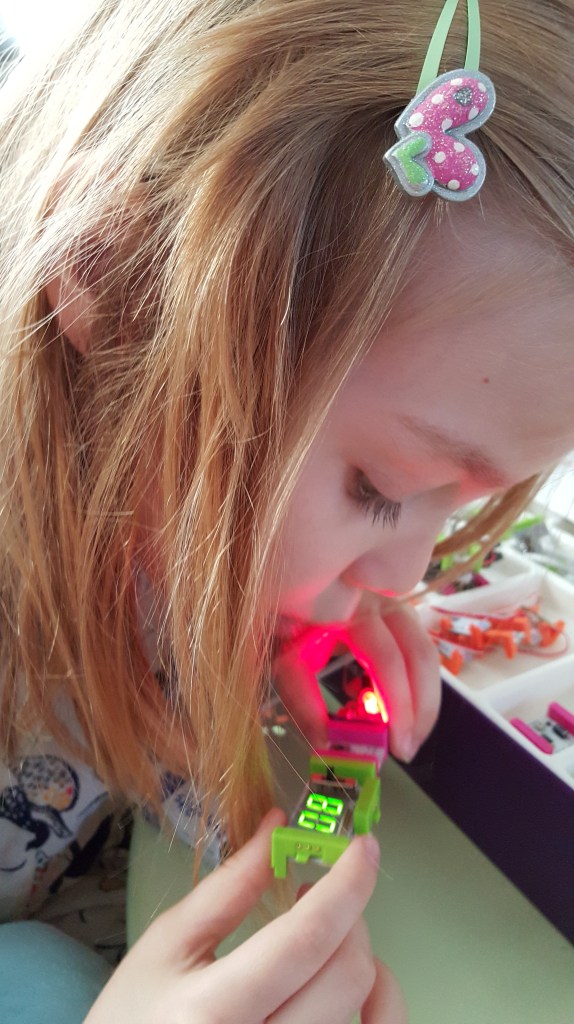
Temperature Sensor

When my daughter started playing with the temperature sensor, she immediately thought it would be cool to see if she could change the temperature reading on the numberBit by blowing on the sensor. Again, it’s important to note that littleBits are not new around my household, but the instruction manual made her see littleBits in a new way and unlocked some of that magical curiosity we love to see in our younger students.

20160306_081646

Prototyping Tips

I love, love, love these prototyping tips! Some of my students often get caught up in perfection and their first idea and they don’t try enough different prototypes to really understand the invention cycle.  Thank you for these tips! Can I have a poster for my makerspace please, littleBits?

20160306_082336

Projects

I like that littleBits has put together real steps for making specific projects. Again, I am all for students creating and inventing on their own, but it always helps to follow some basic instructions first. Especially when you are learning how something works. Too many times, if a student doesn’t understand basic concepts or how each littleBit works, they cannot create an amazing invention. Following a few projects is a great way to help students learn the language of Invention Literacy (something I learned about from Jay Silver) and demystifying how things work. Personally, I’ve been learning to use Arduino the last few years by following and completing projects written by others. I’m only finally to the point now after 3 years where I feel confident enough to create Arduino projects based on my own ideas (3 wearable Arduino projects coming out in my new book!)

The”Invent a Self-Driven Car” is a super cool project, but I wish the kit included the wireless receiver and wireless transmitter so we could invent our own remote control to drive our car, but I guess that is included in the Gizmos and Gadgets kit. Other project instructions in the kit include an art machine, a throwing arm and a security device.

20160306_083524

Inventing

After learning in depth about the bits and making the first project, my 7 YO was ready to start tinkering and seeing what else she could create. She quickly pulled out the forkBit and added a few inputs and outputs. She said, “Mom, why isn’t this working?” When I pointed to the placements of inputs and started to explain, she said, “Tricked you! This only works if I press this button AND move this slide switch.” Wow. My 7 year old just explained AND gate logic? And after just 30 minutes of playing? That’s pretty awesome.


Open Challenges

I love the last section of the manual as well. There are 4 open challenges encouraging students to “Hack your Classroom”, “Invent for good”, inventing a Rube Goldberg like contraption, and lastly a “hack your habits” challenge. I’m hoping to institute the “Invent for Good” challenge at my own library and see if my own students can “invent a product to make a difference in someone else’s life.” My students came up with some pretty cool stuff during the littleBits Halloween Challenge.

Issues

My 7 year old and I still had issues mounting littleBits on the mounting board (this has always been a pet peeve of mine), but its time for me to look into the other mounting solutions offered by littleBits and now that this manual has a full description of each, hopefully I’ll find a new preferred method!

UPDATE: My set was a sample set and luckily littleBits is already on the mounting board case! The new STEAM sets will come with new MOUNTING BOARDS! Lucky you! These look pretty cool and I can’t wait to get my hands on them. I like how they somewhat resemble a PCB Breadboard.

Lastly, the box says it ideal for 3-4 students, but I would expect to use this as more of a partner activity with no more than 2 students per set.

Last but not least….

I just found out from Diana Rendina that the Teacher Guide is available for free! So go check it out and pre-order your new littleBits STEAM Student set today!

Disclaimer: This review consists of my own opinion. littleBits sent me a complimentary student set for this review, but otherwise I am receiving no compensation for this write-up.