Review of Makey Makey Go and Inventor Booster Kit

MakeyMakeyGo

Makey Makey Lessons

If you read my blog then you know I love all things Makey Makey!  While I was writing Makey Makey lesson plans last summer, I was super stoked to hear the announcement of their Kickstarter campaign for the super portable Makey Makey Go. Mine came just in time for Christmas, but unfortunately, I had to hold off on tinkering with it right away because Aaron and I have been busy working on projects for our upcoming book deadline. We’ve finally had some time to work out a few projects with the Go and I am in LOVE with it!

Makey Makey Go Experiments

The first thing we did with the Go during our family maker time was use it with our vintage Operation game. Who needs D batteries when you have a Makey Makey Go? My children had fun picking a sound for the simple Scratch program that would alert the computer every time a player performed a “bad” operation.

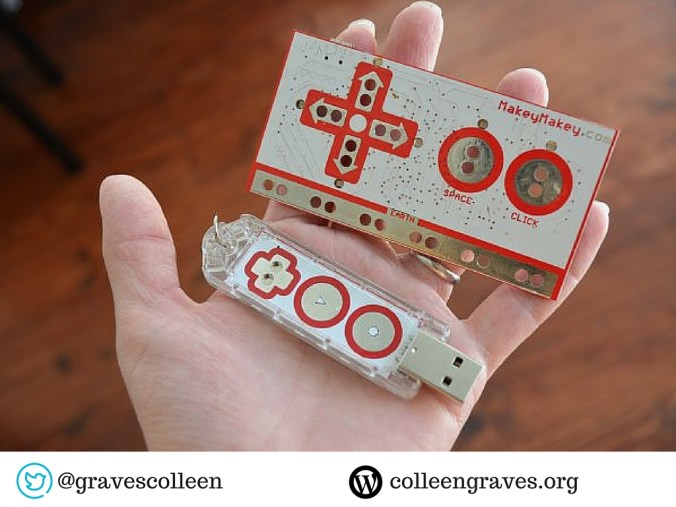
I’m not going to lie though, I didn’t understand Makey Makey Go at first. The first thing I tried to was trigger a selfie while eating a donut. That didn’t work for me though because I was using it wrong!  I’d lost the instructions, so I did a little research and found this review by Geekdad and that’s when I realized there were a couple of very important settings on this super simple maker tool! Check out the super clear instructions available online here.  The Go always has two settings: If the end is blue, it is programmed to mouse left click. You can tap the gear wear to set the Go to space bar and the end will turn red so you are aware of the setting. Plus, you can easily remap your Go space key to any key by going to http://makeymakey.com/remap/ . (However the left click option always stays left click!)

How Does Go Work?

So how does it work? The Makey Makey Go senses the object’s electrical capacity and when you touch the object you add electrons to it which tells the Makey Makey to GO! So it only works with conductive objects much like the original Makey Makey. However, it functions in a completely different way! With the original Makey Makey you (or a banana) complete a circuit to activate keys on your computer.  So when I attached the donut while I was holding it, I wasn’t changing it’s electrical capacity BECAUSE I WAS ALREADY HOLDING THE DONUT. Plus, eating the donut wasn’t going to add any electrons…. doh!

The Go is a pretty amazing little invention. After just a few short weeks of tinkering, I have a whole new understanding of capacitive sensing.

But let me tell you about something else I really love that came with this kickstarter…..

Makey Makey Inventor Booster Kit

Oh, Makey Makey Inventor Booster Kit, where have you been all my life? This inexpensive kit makes inventing with Makey Makey a breeze!

The Booster Kit comes with a piece of conductive fabric, a super long alligator clip, a super long hook up wire, and my absolute two favorite items in the kit…. wait for it…..

A MAKEY MAKEY optimized PENCIL?!?!? Goodbye, bananas, hello graphite!

Plus a roll of super cool conductive tape that reminds me of fabric! You can’t tear it, so it’s much sturdier than copper tape. I found this tape right after finishing my chapter on paper circuits. While I do love copper tape, this conductive fabric tape is THE BOMB!

I envision buying one of these packs to go with every Makey Makey at my library. How cool would it be to check out Makey Makey and let patrons use this Booster Kit?

So what else have we made with it???? Well, that’s kind of a secret.

Beyond the Banana

We had a lot of fun inventing projects for the awesome Makey Makey original and Makey Makey Go in our  upcoming book “The Big Book of Makerspace Projects.” We know you’ll have fun making those projects, but since I can’t share them yet, I worked on this wacky interactive at Ryan Library to include with this review.

Tweet: Go #beyondthebanana with #makeymakey ! #Makerspace resource: http://ctt.ec/U9jb6+ via @gravescolleen

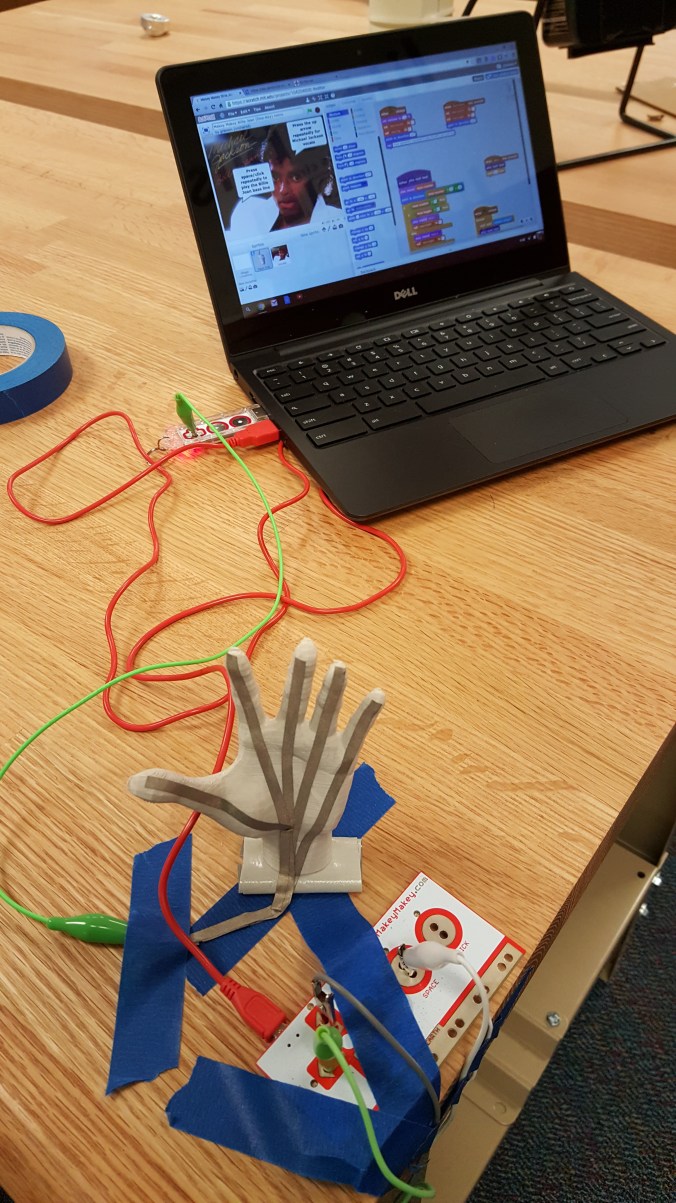
While I was researching Makey Makey Go apps, I stumbled upon Jay’s remix of Eric’s remix of Michael Jackson’s Billie Jean. It’s getting rather late in the school year and our high school students are getting a serious dose of “Senioritis.”To combat senioritis, I worked on creating this MJ display in hopes to motivate my young makers to create their own Makey Makey invention. This interactive relies on pressure sensors that activate when a student “moonwalks” on this moonwalk tutorial foot display. As you dance, the song is played by Makey Makey and Scratch.  I utilized the extra long jumper wires, long alligator clips, and conductive tape to make this happen!

Figuring out how to portray the moonwalk with footprints was the most difficult aspect of this project. Although, making pressure sensors on the floor took me awhile to brainstorm as well. How could I make sure the switches weren’t always touching and activating?

This slideshow requires JavaScript.

Later in the week, a teacher 3dprinted a hand for relay practice, but the hand was too small. So I thought…. hmm… how could I use this with my Michael Jackson Makey Makey interactive? I brought out the conductive tape and attached the hand to the table with a piece of rolled duct tape. Then attached the “Go” and remapped it to play the left arrow key.

The students think this is pretty funny and are baffled at how it works. It’s been fun explaining it to them and I hope they get inspired to Makey Makey their own thing!

What would you create if you had Makey Makey Go?
wp-1460666048376.jpg


My Makey Makey Interactive hacked with Makey Makey Go!

Cool Project Ideas

More cool Makey Makey Go projects: from other makers


Disclaimer: I did not receive any funding or free swag from Makey Makey for writing this post. I backed the Kickstarter and bought myself and my peeps 3 Gos and the Inventor Packs.  I plan on buying many more for next year to get my students experimenting with building games and hopefully apps!
A Library AND a Makerspace

Screen Shot 2016-03-13 at 10.59.17 PM.png

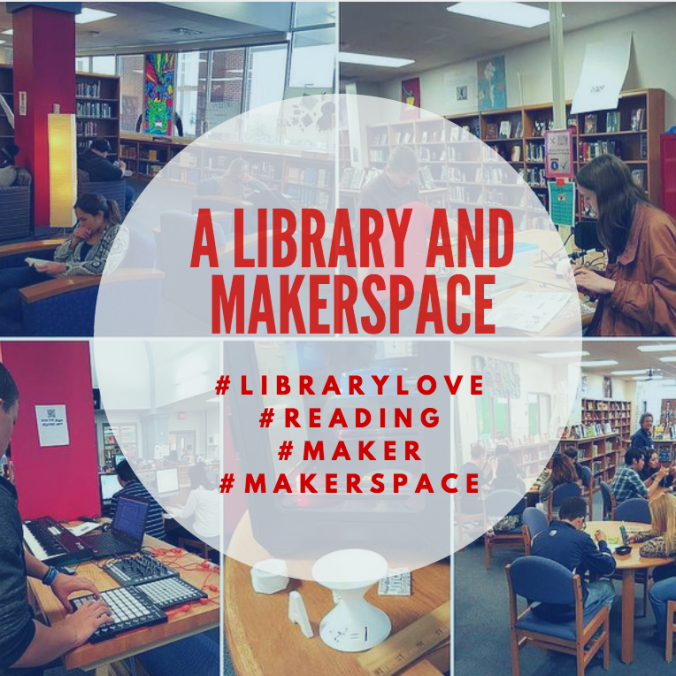
Recently I read an article discussing how libraries are converting to makerspaces. I found this wording dangerous because I love libraries and my library is not just a makerspace. My library is still a library. Yes, we are a learning commons, yes we have a makerspace, but at our core, we are still a library.

Our makerspace is an extension of our library and really a “makerspace” is more of a mindset and philosophy we have towards learning. The makerspace is just one slice of our library pie. We house our maker materials in the library because it is the one place students have access to at any point in the school day.

Goals

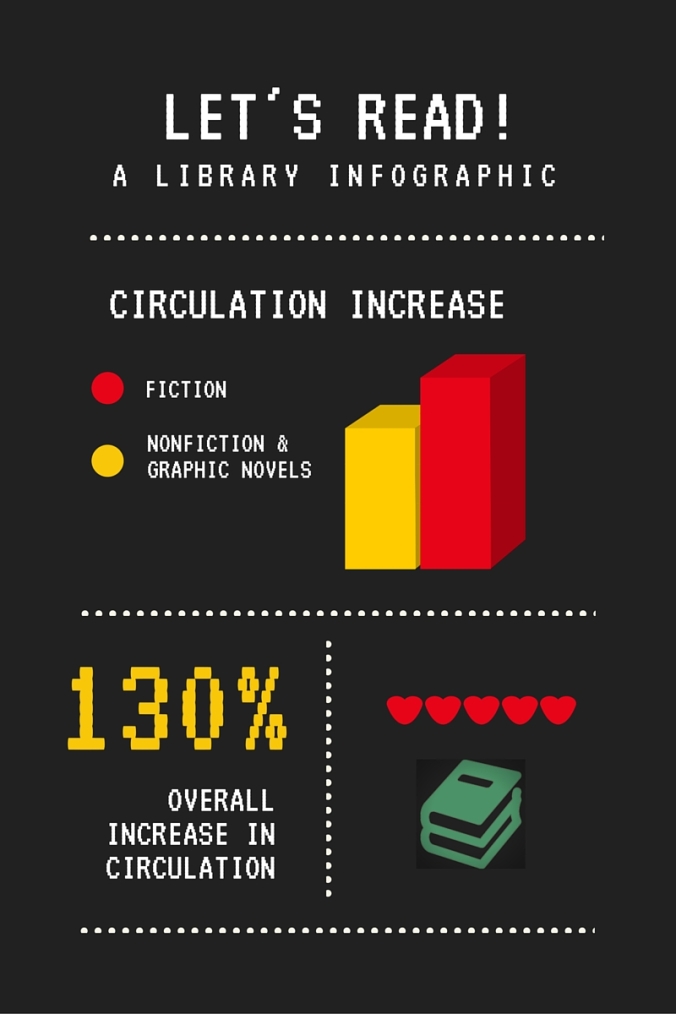
The main goal of my library makerspace is to support and promote literacy. Those literacies include traditional literacies like reading, writing, and research. But also include supporting students in digital literacy, coding literacy, and invention literacy.  However, our main goal is still to get kids to love books and reading. I see the makerspace as an extension of that. When students start inventing and creating, they often need to refer back to research, other projects, etc.  So I keep maker- focused books close to our tinkering tables. I’m happy to report that our overall circulation is up 130%! 

Library

Another pertinent goal for our library is to be a place of support for students and staff. One way we do that is to be a safe place for our students. Every day, around 200-250 students come to the library to read, study, and use our computers. In this ever changing world, the kids still need a place where they know it is safe to pick up a book and learn. They need a place where they feel comfortable to study and learn from one another. Our students here at Ryan are lucky. They have a large commons area just down the stairs from the library where they can commune and eat lunch.  Plus, we let students eat lunch in our library as well. Many of our students visit the library and enjoy our space, and we find that most students who frequent the library are busy, busy, busy little bees -working, studying, and making. One of the things I love most about my library, is that we have kids here studying all of the time. The other day, a student asked me for help with a math problem and another student jumped up quickly and offered her expertise. (Whew! Showing off my inequities in math adverted!)

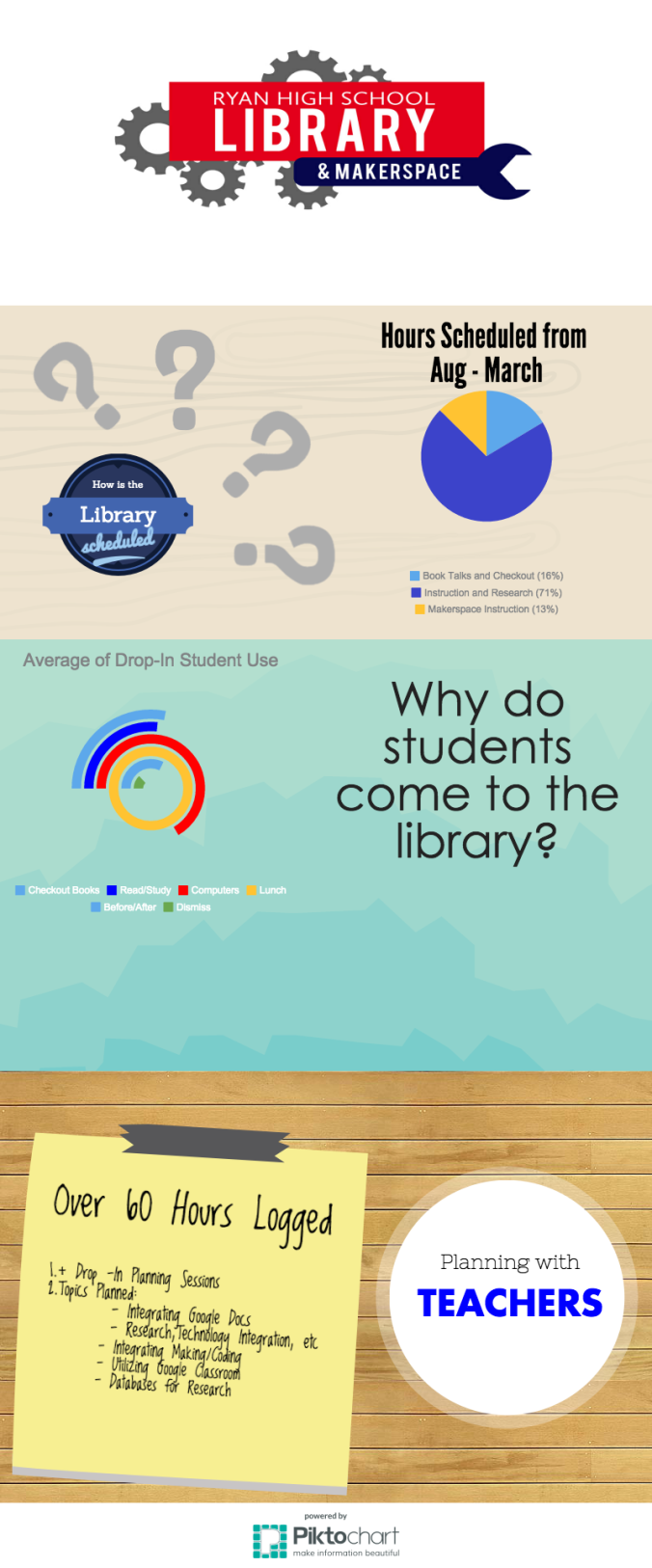
I’ve logged over 60 hours of planning with teachers and that doesn’t include “fly-by” planning where teachers drop in and we have a quick impromptu planning session.  I love helping teachers integrate technology and hope to get more teachers involved in making next school year!

Quiet Spaces

Some kids come to our library just to read! Yes! That still happens! We have many readers here at Ryan High School. Students grew their love of reading in elementary and middle school because they had excellent librarians and reading teachers that planted this important seed.  AND THEY STILL LOVE TO READ! Because of this, we have a quiet reading spot in the back of our library, located by our gorgeous windows. Students know that they need to collaborate in other areas and that these comfy chairs are just for chilling and reading.

Makerspace Instruction

You’ll notice in the infographic at the bottom of this post that specific makerspace instruction only makes up about 13% of scheduled library time. This 13% includes guided workshops and specific makerspace projects. Outside of this scheduled time, students are welcome to use the makerspace at anytime in the school day and they often do. It’s harder to track this and give it a specific number since the students sometimes come in for one reason and end up staying to tinker in the makerspace.

The Tapestry


I love this metaphor I read this week during #SXSWedu in relation to making. Many teachers and librarians can see threads, but just what is the tapestry of the library makerspace?

For me, it’s a buzzing hub of activity. It’s a space where kids come to:

  • Read
    • We still love books and reading is the most important literacy.  Every library needs a space for readers. Mine is located in the back of the library, away from collaborative areas, but still visible from the circulation desk.
  • Learn
    • We have research classes all the time. My goal for next year is to integrate more making into core classes and to help different core subjects teach with the
      Invent to Learn” method of hands-on learning.
  • Make
    • I was highly influenced by teen spaces like Youmedia in the Chicago Public Library. This type of space focuses on a method that understands kids don’t always realize they want to make stuff. Instead, the space is designed for “hanging out, messing around, and geeking out.” I have students that purposely use our makerspace everyday, but I have many others that stumble upon making. Some come in just to hang out, and then end up tinkering and messing around on our audio editing software and figuring out how to use our Novation midis. Others walk in to have lunch and see a soldering workshop and an empty seat and decide to sit down and learn a new skill. While others walk in to renew a book and notice our new 3D printer and ask how it works and how they can use it. Then they come back to learn about 3D Modeling. This is one of my favorite aspects of the library makerspace. It entices students to come back to the library. Plus, it gives EVERY student a reason to come to the library.
  • Study or Complete Assignments
    • Our library is still a place where students come to study. About 20% of the students that come in say they are here just to study! They love to spread out in our classroom areas and work collaboratively or even tutor one another.  Another 30% of our drop-in students come in to use our computers and complete assignments.
  • Research
    • 71% of our scheduled hours are designated to research. I’m happy to collaborate with English teachers and teach our students how to use our databases and research with books. While more and more students use databases, some of our students still prefer using books.

So how does it all come together in a school day? Luckily for me I have a very large space. Our computers are in the front of the library near the circulation desk. We showcase our new books in what used to be periodical shelving to the left of the circ desk. The students eat lunch here as well and at our new cafe tables. Which means our students eat lunch surrounded by books. Sounds pretty great, right?

Our makerspace stuff is getting organized as we speak (be on the look out for an upcoming post!), and we have some tinkering height tables to the right of our circ desk and in front of my office. Our littleBits are housed in a large cabinet by these tables and a student project shelf is also located here. Plus, as mentioned earlier, I have maker books faced out by these tables as well. It’s the best way to get my new coding and Minecraft books checked out.

I’m lucky to have two classroom areas that are separated from the front sections of the library by book shelves. This makes it easy for me to teach research classes even though other students are having lunch in the library, taking stuff apart at our tinkering tables, taking a reading break, or studying collaboratively. For more info on our spaces, see this visual progress post.


I decided to track just how students have been using the library each month and whipped up this interactive infographic over at Piktochart.


ryan-library-stats-aug-march (1)

View the interactive infographic over at Piktochart.